Sovereign AI, No Vendor Lock-In: A Practical Guide
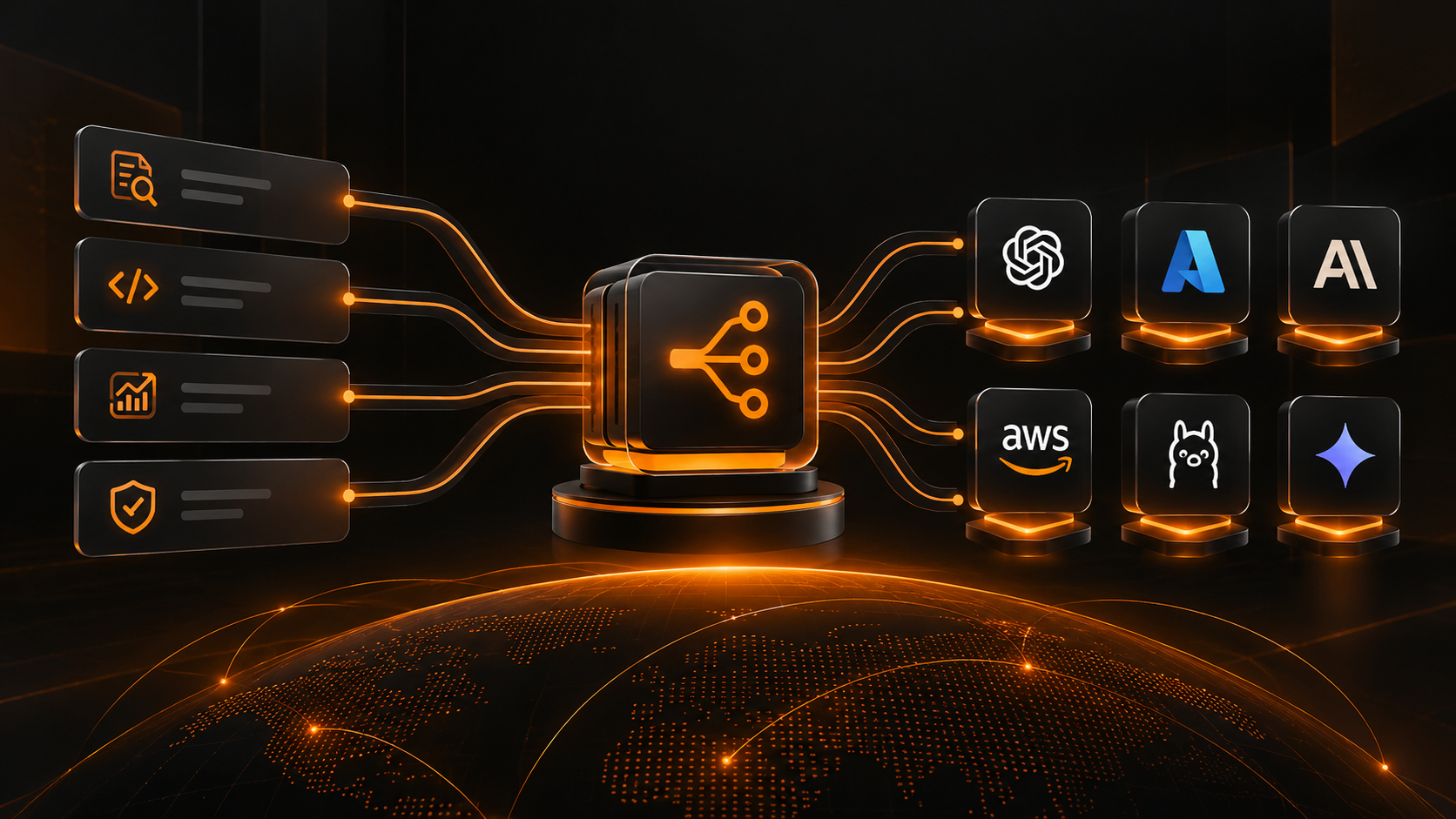
Route different generation tasks to different LLM providers. Support 6 providers: OpenAI, Azure OpenAI, Anthropic, Bedrock, Ollama, Gemini. No vendor lock-in. Sovereign AI.
The vendor lock-in risk
You choose an LLM provider. Everything works. Your entire AI workflow depends on it.
Then the provider raises prices. Or their API changes. Or they decide your industry is not worth supporting.
You are locked in. Your alternative is to rewrite everything for a different provider.
That is the risk every team faces when they commit to a single LLM vendor.
The multi-LLM solution
Do not commit to one vendor. Route different tasks to different providers based on what works best for each task.
Test generation? Use Model A. Gap analysis? Use Model B. Code suggestions? Use Model C.
Each task runs on the provider that is best and cheapest for that task. You are not locked in to any single vendor.
You own the routing logic. If a provider gets too expensive or too slow, you swap it out. No rewriting. Just change the routing.
The six providers
WalnutAI supports routing to:
OpenAI: GPT-4, GPT-4o, fine-tuning available
Azure OpenAI: OpenAI models, hosted in your Azure tenant
Anthropic: Claude family, in-context learning
AWS Bedrock: Claude, Llama, Anthropic models in AWS
Ollama: open-source models, runs locally or on-premise
Google Gemini: latest Google LLM, via Vertex AI
You can use any combination of these. Most teams use 2 to 3 providers. Some use all six.
How multi-LLM routing works
The mechanism
WalnutAI maintains a routing configuration per project. For each generation task, you specify:
Task: test-generation, gap-analysis, defect-clustering, code-suggestion
Primary provider: which provider to use by default
Fallback provider: which provider to use if primary fails
Cost optimization: use cheaper provider if quality is acceptable
Every time a task runs, the router checks the configuration and picks the provider.
Example routing config
Project: payment-processing test-generation -> Anthropic (best at understanding complex logic)
gap-analysis -> OpenAI (fastest for large codebases)
defect-clustering -> Azure OpenAI (private Azure tenant required)
code-suggestion -> Ollama (runs locally, no API cost)
Each task goes to the best provider for that specific task.
Why this matters
Cost optimization
Not all tasks need the most expensive LLM. Gap analysis might work fine on GPT-3.5. Code generation needs GPT-4.
Route gap analysis to a cheap provider. Route code generation to an expensive one. Optimize cost per task.
Performance optimization
Different providers have different latency profiles. Anthropic is fast for semantic analysis. OpenAI is fast for code.
Route each task to the provider with the best latency for that task. Your results come back faster.
Compliance and data residency
Some tasks can use cloud providers. Others need to stay on-premise.
Route tasks that need data residency to Ollama (runs locally). Route other tasks to cloud providers.
One system, multiple compliance profiles.
Sovereignty
You are not dependent on any single vendor. If OpenAI raises prices, you swap gap-analysis to Anthropic.
Your customers are not dependent on you being locked in. You can guarantee availability and pricing.
The governance advantage
Multi-LLM routing means you own the LLM strategy. Not the vendor.
As new providers launch, you evaluate them. If one is cheaper or faster for your workload, you add it.
Your procurement team can negotiate better rates because you are not locked in.
Your engineering team can choose the best tool for each problem.
What each provider is best at
OpenAI GPT-4
Best at: complex reasoning, multi-step logic, code generation. Cost: high.
Use for: critical generation tasks where quality is paramount.
Azure OpenAI
Best at: OpenAI models in your Azure tenant. Cost: similar to OpenAI, plus Azure commitment.
Use for: regulated teams that need Azure infrastructure.
Anthropic Claude
Best at: semantic understanding, long context, requirement analysis. Cost: moderate.
Use for: gap analysis, requirement extraction, complex document analysis.
AWS Bedrock
Best at: Claude via Bedrock, multi-model access, AWS infrastructure. Cost: moderate to high.
Use for: teams committed to AWS infrastructure.
Ollama (local)
Best at: runs locally, no API costs, privacy. Quality: lower than cloud models. Cost: zero (compute only).
Use for: cost-sensitive tasks, local-only data, edge deployments.
Google Gemini
Best at: multimodal (text + images), real-time reasoning. Cost: moderate.
Use for: tasks that benefit from image analysis or latest Google research.
Common routing strategies
Cost optimization
Primary: Ollama (cheapest). Fallback: Anthropic (good fallback). Critical path: OpenAI (best quality).
Result: most tasks run on local LLM, save money. Important tasks get best-in-class quality.
Provider diversity
No single provider handles more than 40% of your traffic. If one provider has an outage, you still function.
Result: high availability. No single point of failure.
Hybrid compliance
Sensitive tasks: Ollama (local). Non-sensitive: mix of cloud providers.
Result: compliance satisfied, cost optimized.
For procurement teams
Multi-LLM routing lets you negotiate with multiple vendors. You can say: "We use your competitor for 40% of workload, but we would shift to you for 70% if you reduce pricing by 20%."
You have leverage. Single-vendor solutions do not.
For engineering leaders
You are not betting the company on one LLM vendor. If a vendor fails or pivots away from your use case, you have alternatives.
That is strategic optionality. That is how you build resilient systems.
Next week: deeper dives
This week we will cover:
How to configure multi-LLM routing for your projects
Cost optimization strategies per workload type
Provider selection and evaluation
Fallback and failover logic
For now: think about your LLM dependency. Are you locked in to one vendor? Multi-LLM routing solves that.
Escape vendor lock-in. Deploy multi-LLM routing. https://www.walnutai.ai/